Install the application
Goal
Get Decision Theatre running on your machine.
You probably do not need this
Decision Theatre is hosted at africanlandscapefutures.wits.ac.za and needs no installation. Run it locally only if you need it offline — in the field, or in a workshop without reliable internet.
To use the hosted version instead, start at Step 1 — Open the dashboard.
Background
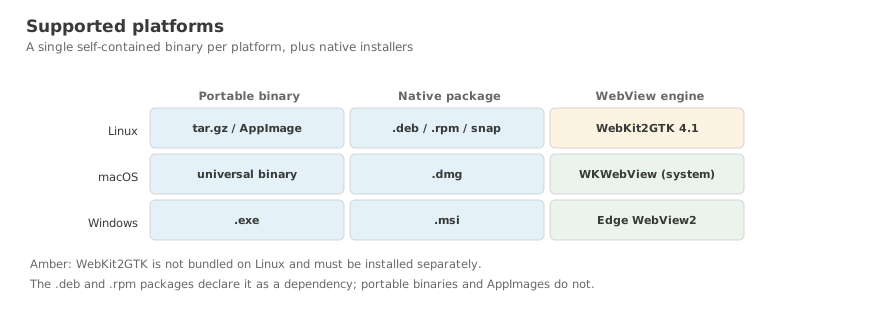
Decision Theatre ships as a single self-contained binary per platform, plus native installers. There is no database to set up and no web server to configure — the application carries its own.
What it does not carry is the data. That comes separately as a data pack, which you will install in the next step.
Steps
Download the latest release from GitHub Releases, then:
| Format | Install command |
|---|---|
| Debian / Ubuntu | sudo dpkg -i decision-theatre-*.deb |
| Fedora / RHEL | sudo rpm -i decision-theatre-*.rpm |
| AppImage | chmod +x *.AppImage && ./*.AppImage |
| Flatpak | flatpak install decision-theatre.flatpak |
| Snap | sudo snap install --dangerous *.snap |
| NixOS | nix profile install github:kartoza/DecisionTheatre |
.deb, .rpm and AppImage are available for both amd64 and arm64. Flatpak and Snap are amd64 only.
WebKit2GTK 4.1 is required for the desktop window. The .deb and .rpm packages install it for you; for the portable archive and AppImage, install it yourself:
Download the .dmg for your architecture (Intel or Apple Silicon), open it, and drag Decision Theatre to your Applications folder.
No additional dependencies — WKWebView ships with macOS.
Download and run the .msi installer. It installs to C:\Program Files\Decision Theatre\.
The installer includes Microsoft's WebView2 bootstrapper and installs the runtime if it is missing. If you use the portable .zip instead and no window appears, install the WebView2 Runtime manually from Microsoft.
Start it
A native window opens. To run without a window and use your browser instead:
Useful flags
| Flag | Default | Purpose |
|---|---|---|
--data-dir | (auto) | Where the map tiles, GeoPackage, metadata and lookups live |
--port | 8080 | HTTP port |
--headless | false | No desktop window |
--version | Print the version and exit |
With no --data-dir, the application looks for a previously installed data pack recorded in its settings file.
Where settings are kept
| Platform | Path |
|---|---|
| Linux | ~/.config/decision-theatre/settings.json |
| macOS | ~/Library/Application Support/decision-theatre/settings.json |
| Windows | %APPDATA%\decision-theatre\settings.json |
What you achieved
- The application is installed and starts
- You know how to run it with a window or headless
- You know where its settings are kept