Development Environment
Decision Theatre is developed inside a Nix flake. The flake pins every tool the project needs — Go, Node, the documentation toolchain, the geospatial utilities, the packaging tools — so a checkout builds identically on any machine without installing anything system-wide.
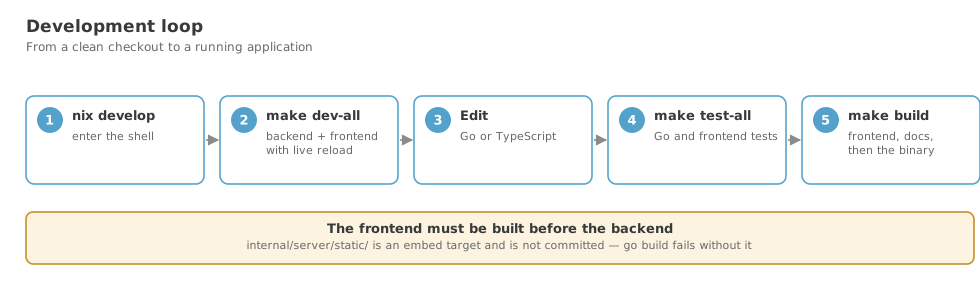
If you take one thing from this page: work inside nix develop. Every command below assumes you are in that shell.
Prerequisites
Nix with flakes enabled. That is the only requirement.
# Install Nix (multi-user)
sh <(curl -L https://nixos.org/nix/install) --daemon

# Enable flakes
mkdir -p ~/.config/nix
echo "experimental-features = nix-command flakes" >> ~/.config/nix/nix.conf
direnv makes this automatic
With direnv installed, the committed .envrc enters the shell for you whenever you cd into the project:
Entering the shell
The first entry downloads and builds the toolchain, which takes a while. Subsequent entries are instant.
One task, three spellings
Every task in the project has the same name whichever way you reach it:
dt <task> | in any terminal inside the development shell |
make <task> | if you prefer make, or are outside the shell |
<leader>p<key> | in neovim |
nix run .#<task> | for the tasks that must work without the shell — CI uses these |
dt is a dispatcher, not a second implementation: it reads the task list out of the Makefile's .PHONY lines, so it cannot offer a task that does not exist, nor miss one that was just added. A mistyped task suggests the closest real names.
dt run --port 9090          # extra flags reach the underlying tool
dt check-data DATA_DIR=/srv # NAME=value reaches make as a variable
dt doctor                   # is this checkout healthy?
dt                          # the command table
The command table
The shell greets you with every available command, grouped by intent: run the app, live development, build, test, diagnose, data pack, documentation, release and shortcuts.
Type dt at any time to bring it back, or name a group for the detail:
dt              # the overview — every group, one screen
dt flake        # detail for one group
dt diagnose     # ditto
dt help test    # a name that is both a task and a group
Where a word names both a task and a group — run, build, test, docs, release — the task wins, because dt test should run the tests; that is what anyone typing it means. dt help <name> is the unambiguous form. Names that are only groups — develop, diagnose, flake, data — need no such ceremony.
The table is scripts/shell-help.sh, and it is the only place commands are listed: the shell greeting, dt, and dt help all render it, so none of them can drift. dt help GROUP=data filters the same way. Adding a command means adding one GROUP|command|what it does line to that file — nothing else needs editing.
The header spans the grid and carries the version and the current branch, with an asterisk when the tree is dirty — so a glance tells you what you are working on and against.
Each group carries an icon — including nix's own snowflake on FLAKE. They are plain single-width Unicode symbols rather than emoji, because emoji are double-width and a terminal that measures them differently from lipgloss tears the grid apart. Set DT_HELP_ICONS=0 if your font renders any of them as a missing glyph.
It is rendered with gum, which the development shell provides: the overview is a grid of cards that reflows to two or one column on a narrow terminal, and dt <group> renders the same panels with a row per command — the two views share one visual language rather than looking like different programs. When gum is absent — dt help from outside the shell, or CI — the script falls back to a plain aligned layout with the same content, so nothing depends on gum being there. Either way it drops colour when piped and exits cleanly into head or less.
Why dt is an executable, not a shell function
It lives in devbin/, which both .envrc and scripts/dev-shell.sh put on PATH.
This matters because of how direnv works. use flake evaluates the devShell in a subshell and carries back the environment — variables — not the shell state. Functions and aliases defined in the flake's shellHook do not survive it. Since this repository is normally entered through direnv rather than an interactive nix develop, anything defined as a function would silently not be there:
A directory on PATH is something direnv can do, so dt works identically whether you use direnv, nix develop, a subshell, or none of them — and which dt answers.
The two-letter aliases (gor, gs, gd …) are still aliases and therefore still nix develop-only. That is a fair trade for conveniences; anything that must work everywhere belongs in devbin/.
After pulling a change to .envrc
direnv blocks an .envrc it has not seen before. Run direnv allow once.
dt doctor checks that dt is on PATH, so this class of problem reports itself.
Where the shell setup lives
flake.nix's shellHook does nothing but source scripts/dev-shell.sh, which sets GOPATH and friends, puts devbin/ on PATH, defines the aliases, and renders the table once.
Keeping it in a shell file rather than in a Nix string is deliberate, and follows the project's rule that Nix files hold no embedded code: the environment is then ordinary shell — reviewable with shell tooling, editable without a rebuild, and testable by sourcing it in a plain bash.
There is deliberately no second help command. dt with no arguments is the table, so there is nothing to keep in sync with it.
What the shell provides
| Area | Tools |
|---|---|
| Go | go, gopls, golangci-lint, delve, go-tools, gomodifytags, gotests, impl, air |
| Frontend | nodejs_22 |
| Documentation | mkdocs, mkdocs-material, mkdocs-minify-plugin (as mkdocsEnv) |
| Geospatial | tippecanoe, gdal, sqlite |
| Packaging | nfpm, zip, gnumake, gcc, pkg-config |
| Desktop runtime | webkitgtk_4_1, gtk3 |
| Nix | nil, nixpkgs-fmt |
| Security | trivy |
| General | git, gh, ripgrep, fd, eza, bat, fzf, tree, jq, yq |
GOPATH is set to $PWD/.go, so the Go module cache stays inside the project rather than in your home directory.
Running the application
The application has two run modes, and one launcher serves both:
nix run                                   # desktop app in its own window
nix run .#serve                           # web server only; browse to localhost:8080
nix run . -- --data-dir /path/to/data     # point at a specific data directory
Every entry point — dt run, dt serve, nix run, nix run .#serve and the neovim <leader>pr mapping — calls scripts/run-app.sh, which is the single place the launch policy is defined. nix run supplies a store-built binary through DT_BIN so the script skips building; dt run rebuilds only what is stale. The flags, the desktop-vs-server decision and the data directory resolution are identical in both cases.
nix run builds from the current checkout, including uncommitted work — though note that Nix only sees files git knows about, so a brand-new file must be git added before the flake can build it.
For everyday work, prefer dt run: it is incremental, whereas nix run re-runs the full reproducible build.
Per-machine settings — including the MapTiler API key the satellite basemap and font-glyph proxy need — go in a gitignored .dt-env file (copy .dt-env.example), which every entry point above reads identically. See README.dev.md in the project root ("Run the Application") for the full list of knobs — it lives outside this site's own docs/ tree, so it isn't linkable from here.
nix run commands
| Command | What it does |
|---|---|
nix run | Build and launch the desktop application |
nix run .#serve | The same application as a web server, no window |
nix run .#check-data | Check a data directory and summarise its contents |
nix run .#check-data -- /srv/data | Check a specific directory |
nix run .#pack-data | Check, then build a distributable data pack |
nix run .#validate-data | Deprecated alias for check-data |
check-data and pack-data are subcommands of the application binary rather than separate tools, so they read a data directory through exactly the same packages the running application does. Useful as a deployment gate:
See Checking the Data Directory.
nix build targets
| Command | Produces |
|---|---|
nix build | The full application at ./result/bin/decision-theatre |
nix build .#decision-theatre | The same, named explicitly |
nix build .#frontend | The built SPA only |
nix build .#docs | This documentation site only |
nix build .#run-app | The desktop launcher wrapper |
nix build .#serve-app | The server launcher wrapper |
nix build .#check-data | The data checker on its own PATH name |
nix build .#pack-data | The data-pack builder on its own PATH name |
That last line is exactly what CI runs to prove the artefact works.
nix flake check
This runs the go-tests and frontend-tests checks in isolated build environments.
This does not currently pass
checks.frontend-tests has an empty npmDepsHash, which is not a valid fixed-output hash, and checks.go-tests omits the webkit build inputs that the package itself needs. Use dt test-all until this is fixed.
Ticket: flake.nix embeds code inline and nix flake check cannot pass.
Everyday commands
dt is the primary spelling for every task; make <task> and the neovim <leader>p mappings reach the same targets, and the nix run entry points above exist for the tasks CI must run without entering this shell.
The full list, with a description per command, is on Command Reference — generated from scripts/shell-help.sh at build time so it cannot drift from what dt offers. The groups you will use most often:
RUN
start the app
| Command | What it does |
|---|---|
dt run | Desktop app in its own window — builds whatever is stale |
dt serve | Web server only; open http://localhost:8080 in a browser |
dt run --port 9090 | Extra arguments are passed through to the binary |
nix run | Desktop app from a reproducible build |
nix run .#serve | Web server from a reproducible build |
<leader>pr / ps | The same two from inside neovim |
DEVELOP
hot reload
| Command | What it does |
|---|---|
dt dev-all | Go hot-reload + Vite HMR — open http://localhost:5173 |
dt dev-backend | Go backend only, auto-rebuilding on :8080 |
dt dev-frontend | Vite dev server only, HMR on :5173 |
BUILD
make artefacts
| Command | What it does |
|---|---|
dt app | Frontend, docs and binary — everything needed to run |
dt build-frontend | Frontend only, into the embed directory |
dt build-docs | Documentation site only, into the embed directory |
dt clean | Remove build artifacts |
nix build | Full reproducible build to ./result |
dt container | Deployment container image, built from the flake |
TEST
prove it works
| Command | What it does |
|---|---|
dt test | Go tests with race detector and coverage |
dt test-frontend | Frontend tests (vitest) |
dt test-scripts | Tests for the shell scripts |
dt test-all | All three suites |
nix flake check | Every check, in a sandbox |
For everything else — diagnosing a problem, keeping the flake importable, preparing a data pack, building the documentation, cutting a release — see the Command Reference, or run dt for the same table in the terminal.
These tables are generated
Adding a command to scripts/shell-help.sh makes it appear here, in dt, in dt help and in the shell greeting from one edit. This section used to list the make targets by hand, and went on describing dt dev as "build the backend once and run it on port 8080" long after it became an alias for dt run.
Continuous integration
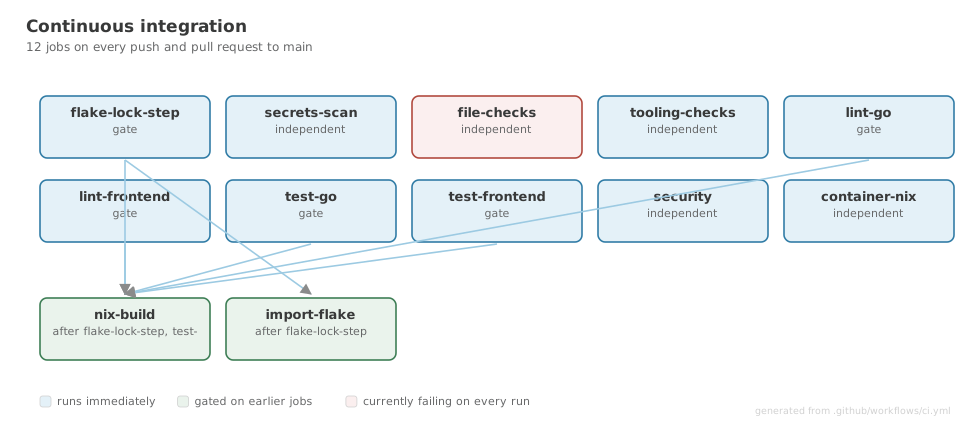
.github/workflows/ci.yml runs on every push and pull request to main:
| Job | Runs |
|---|---|
secrets-scan | TruffleHog (verified only) and Gitleaks |
file-checks | Large-file and unwanted-file scan |
lint-go | scripts/gofmt-check.sh, then golangci-lint against .golangci.yml |
lint-frontend | npx tsc --noEmit only |
test-go | go test -race -coverprofile=coverage.out ./... |
test-frontend | npm test |
nix-build | nix build, then --version, gated on the four jobs above |
security | Trivy filesystem scan, failing on CRITICAL and HIGH |
.github/workflows/release.yml runs on a v* tag: a five-platform build matrix, then parallel packaging jobs, then a published GitHub Release.
file-checks fails on every run
It scans with find . -name "*.env", which matches the tracked frontend/.env, so it exits non-zero on every push and pull request.
To reproduce CI locally:
dt check          # fmt-check, lint, test — the same questions CI asks, in order
nix build && ./result/bin/decision-theatre --version
trivy fs --severity CRITICAL,HIGH .
Diagrams and provenance
The documentation illustrations come from two places, and each figure is marked so you can tell which at a glance.
- Generated — redrawn from the codebase on every docs build by
docs/hooks/generate_diagrams.py. It parses the real source, so it cannot describe something the project no longer does. Change the code and the diagram follows. - Hand-authored — a workflow or concept drawn deliberately in
docs/hooks/diagrams_concept.py, using the same brand library so the whole set reads as one piece of work.
How generation works
| File | Role |
|---|---|
docs/hooks/generate_diagrams.py | MkDocs on_pre_build hook; orchestrates everything |
docs/hooks/svglib.py | Brand-aware SVG primitives — boxes, lanes, arrows, bars, matrices |
docs/hooks/diagrams_state.py | Generators that parse real project files |
docs/hooks/diagrams_concept.py | Hand-authored workflow and concept diagrams |
docs/assets/css/kartoza-palette.json | The palette both the diagrams and the site CSS read |
Output lands in docs/assets/diagrams/generated/, which is gitignored — the diagrams are build artefacts, not source.
There is no runtime dependency beyond the Python standard library, which keeps the docs build reproducible under Nix.
Restart mkdocs serve after editing a hook
A running server holds the old hook module in memory and will regenerate stale diagrams over your changes. Your edits will appear to do nothing until you restart.
Why the generators never write unchanged files
The hook writes into docs/, which is exactly what mkdocs serve watches. An unconditional write would retrigger the build, which would write again — an endless reload loop. The hook therefore compares content and skips identical files. This works only because diagram output is deterministic: do not introduce timestamps or randomness into a generator.
Adding a generated diagram
- Write a function in
diagrams_state.pytaking(root: Path, palette: dict)and returning an SVG string, orNonewhen its source is unavailable. - Register it in that module's
ALLdict. - Reference it from a page with
class="gen"on the caption.
Return None rather than raising when a source file is missing: the Nix docs derivation may be given a narrower source tree than a working checkout, and a missing diagram should degrade rather than fail the build.
Nix maintenance
nix flake update                 # update all inputs
nix flake lock --update-input nixpkgs
nixpkgs-fmt flake.nix            # format
nil diagnostics flake.nix        # lint
flake.lock is committed and treated as sacred — lockfile updates belong in their own pull request, never mixed with functional change.
Nix only sees tracked files
In a git repository, a flake build copies only files git knows about. A new file must be git added — even without committing — before nix build or nix run can see it. The symptom is a confusing "file not found" from inside the build sandbox.
Editor integration
gopls, nil and the TypeScript language server are all in the shell, so an editor launched from inside nix develop picks them up with no further configuration.
The project also ships .exrc and .nvim.lua for Neovim users.