Preparing a Release
Version Tagging
Releases are triggered by pushing a Git tag matching v*:
This triggers the GitHub Actions release workflow.
A tag carrying a pre-release identifier — anything with a hyphen after the version, such as v2.4.0-rc1 or v2.4.0-beta.2 — is treated differently in two places: the GitHub release is marked as a pre-release, and the container image does not take the :latest tag. See Phase 4.
What the Release Workflow Does
The .github/workflows/release.yml workflow has four phases:
Phase 1: Build Binaries
The documentation is built first, once, by the docs job: nix build .#docs — the same derivation docs.yml and the container image use. Every platform build downloads that site and embeds it rather than building its own, so the plugin list lives in flake.nix and nowhere else.
Then platform-specific binaries, using a matrix strategy:
| Runner | Target | Archive |
|---|---|---|
ubuntu-latest | linux/amd64 | .tar.gz |
ubuntu-24.04-arm | linux/arm64 | .tar.gz |
macos-13 | darwin/amd64 | .tar.gz |
macos-14 | darwin/arm64 | .tar.gz |
windows-latest | windows/amd64 | .zip |
For each platform:
- Sets up Go 1.24 and Node.js 22
- Builds the frontend (
npm ci && npm run build) - Downloads the documentation the
docsjob built - Copies built assets into
internal/server/static/andinternal/server/docs_site/ - Installs platform-specific CGO dependencies
- Builds the Go binary with
-ldflags "-s -w -X main.version=<tag>" - Packages into
.tar.gz(Unix) or.zip(Windows) - Generates SHA256 checksums
The matrix does not fail fast. Every platform is required for the release, so cancelling the other four the moment one fails only hides how much is broken.
Phase 2: Package Installers
After binaries are built, parallel packaging jobs create platform-native installers:
| Job | Output | Tool |
|---|---|---|
package-linux-nfpm | .deb, .rpm (amd64 + arm64) | nfpm |
package-appimage | .AppImage (amd64 + arm64) | appimagetool |
package-flatpak | .flatpak (amd64) | flatpak-builder |
package-snap | .snap (amd64) | snapcraft |
package-macos | .dmg (amd64 + arm64) | hdiutil |
package-windows | .msi (amd64) | WiX Toolset |
Phase 3: Publish Release
All artifacts are collected and published as a GitHub Release with:
- Platform archives (
.tar.gz,.zip) - Installer packages (
.deb,.rpm,.AppImage,.flatpak,.snap,.dmg,.msi) - Merged SHA256 checksums file
- Auto-generated release notes with installation instructions
Before it publishes anything, the job checks that every artefact listed above is actually present and fails the release if one is missing, naming it. A packaging job that produced nothing used to surface only as a release quietly missing a platform. The expected set is the list in Phase 1 and Phase 2 — five archives, two .deb, two .rpm, two .AppImage, one .flatpak, one .snap, two .dmg and one .msi — so adding a packaging job means adding it to that check too.
Phase 4: Publish the Container Image
The container job builds the deployment image from the flake, verifies that it runs and serves, and pushes it to GHCR:
| Tag | Published for | Moves? |
|---|---|---|
ghcr.io/kartoza/decisiontheatre:<version> | every v* tag | Never — an immovable pin |
ghcr.io/kartoza/decisiontheatre:latest | stable releases only | Repointed at each new stable release |
docker pull ghcr.io/kartoza/decisiontheatre:2.4.0   # this exact release
docker pull ghcr.io/kartoza/decisiontheatre:latest  # the newest stable release
Pre-release tags publish their version tag and stop there. Whatever :latest points at is what an unpinned docker pull deploys, so a release candidate must never land there.
The job also attaches the image tarball, its SBOM (sbom.spdx.json) and its vulnerability scan (cve-scan.json) to the release, and appends a section to the release notes naming both tags. It runs after Phase 3 rather than alongside it, because it appends to the release body that Phase 3 sets outright — run concurrently, whichever finishes last wins, and roughly half the time the container section is the one that gets overwritten.
See Server Deployment for running the image.
Pull request builds are not published to the registry
CI builds the same image on every pull request, but keeps it as a run artefact for 7 days rather than pushing it — there is nothing to docker pull. It is tagged decision-theatre:<flake version>-<commit>, so builds from different pull requests are distinguishable and do not overwrite each other when loaded. The CI comment on the pull request carries the gh run download command that fetches it.
Building Packages Locally
You can build release packages locally using dt packages. This builds the frontend and docs, then cross-compiles for each platform:
# All platforms (linux native + windows cross-compile)
dt packages

# Single platform
dt packages-linux
dt packages-windows
dt packages-darwin   # macOS only (requires running on macOS)
Output in dist/:
| Platform | Artefacts | Requirements |
|---|---|---|
| Linux | .tar.gz, .deb, .rpm | Native build; nfpm for deb/rpm (in nix devShell) |
| Windows | .zip, .msi | mingw-w64 cross-compiler (in nix devShell); WiX v4+ for .msi |
| macOS | .tar.gz or .dmg | Must run on macOS |
The script (scripts/build-packages.sh) accepts --platform, --arch, and --version flags for fine-grained control:
Downloads Page Auto-Configuration
scripts/pack-data.sh, scripts/build-windows-installer.sh, scripts/build-debian-installer.sh, the macOS build in scripts/build-packages.sh, and scripts/build-cross-docker.sh each call scripts/update-download-config.sh after producing their artefact. It writes the artefact's path into the local settings.json that internal/config.SettingsDir() reads (e.g. ~/.config/decision-theatre/settings.json on Linux), which is what the in-app downloads page serves. Practically: build on the same machine you run the app on, and the download page immediately offers the new files — no manual settings edit needed. Requires jq; if it's missing, the update is skipped with a warning rather than failing the build.
This is the host's settings.json, not the Docker deployment's. If you're serving the downloads page via deployments/docker-compose.yaml, the app container has its own, separate settings.json under /root/.config/decision-theatre (a named volume, decision-theatre-settings, so it survives container recreation). scripts/build-cross-docker.sh handles this automatically: if the deployments-app container is running and the artefacts landed under dist/ (the default --dest, bind-mounted into the container at /app/dist), it additionally docker execs update-download-config.sh inside the container with the container-internal paths, mirroring what dt datapack already does for data packs.
If you used a custom --dest outside dist/, or need to update the container's config by hand for another reason, point it at the container-internal paths by running the same script inside the container instead:
docker exec deployments-app-1 /app/scripts/update-download-config.sh \
  --executable-linux /app/dist/cross/decision-theatre \
  --executable-windows /app/dist/cross/decision-theatre.exe
The runtime image includes jq for exactly this purpose.
Building Executables in Docker
If you don't want to install Nix, Go, Node, or mingw-w64 locally, deployments/Dockerfile.cross builds the raw Linux and Windows executables inside Docker (frontend + docs included), using BuildKit's --output to export the binary straight to a directory — no container to clean up afterwards.
Requires Docker with BuildKit (Docker 23+, or DOCKER_BUILDKIT=1 set).
Use scripts/build-cross-docker.sh rather than calling docker build directly — the export targets only place files in the output directory, they don't touch the downloads page config the way the other build-*.sh scripts do, so this wrapper builds and then calls update-download-config.sh itself (both on the host, and inside the deployments-app container if it's running — see above):
# Both platforms -> dist/cross/decision-theatre, dist/cross/decision-theatre.exe
./scripts/build-cross-docker.sh

# Single platform
./scripts/build-cross-docker.sh --platform linux
./scripts/build-cross-docker.sh --platform windows

# Custom version / output directory
./scripts/build-cross-docker.sh --platform windows --version 0.2.0 --dest dist/cross
This produces the bare executables only — not installers (.deb, .msi, etc.). Feed the exported binary into packaging/ tooling (e.g. nfpm, WiX) if you need a package.
If you need the raw docker build --output invocation directly (e.g. for a custom pipeline), see the export-linux-amd64, export-windows-amd64, and export-all targets in deployments/Dockerfile.cross — just remember to run scripts/update-download-config.sh yourself afterwards.
macOS is not available in Docker. The app links against Cocoa/WebKit via CGO, which requires Apple's SDK and toolchain. That SDK isn't redistributable and there's no reliable open cross-toolchain for it, so macOS binaries must be built natively on macOS via dt packages-darwin (see the table above).
Running it via the builder service instead of a local Docker install
On a production server managed with deployments/docker-compose.yaml, you generally don't want to install Nix/Go/Node/mingw-w64 on the host just to build a datapack or refresh the executables — the host is only expected to have Docker. The builder service in that compose file carries that whole toolchain (see deployments/Dockerfile.builder) and runs make pack-data / build-cross-docker.sh for you:
cd deployments
docker compose --profile build run --rm builder make pack-data
docker compose --profile build run --rm builder ./scripts/build-cross-docker.sh
It's gated behind the build Compose profile so docker compose up never starts it — it only runs on demand, and --rm removes the container again once it exits.
Both scripts write their output to the decision-theatre-dist named volume (mounted at /src/dist in builder, and read-only at /app/dist in app) rather than to the builder container's own filesystem — nothing built here is retained once the container is removed except what landed on that volume. This is what scripts/scheduled-redeploy.sh uses for its unattended nightly rebuild.
The builder service also bind-mounts the host's Docker socket, since build-cross-docker.sh itself shells out to docker build/docker compose/docker exec (to run Dockerfile.cross and to push config into the running app container) — those reach the host daemon through that socket. This is the standard "Docker-outside-of-Docker" pattern; it gives the builder container the same level of control over the host as any other process with access to that socket, which is why the service is opt-in via the build profile rather than always running.
Building a Data Pack
Data packs are built locally (not in CI) because they contain large binary data files:
This creates dist/decision-theatre-data-v{VERSION}.zip with a SHA256 checksum. Upload the data pack to the GitHub Release manually or distribute it separately.
dt datapack also updates the downloads page config (see above): scripts/pack-data.sh updates the host's settings.json, and if the deployments-app container from deployments/docker-compose.yaml is running, the Makefile target additionally docker execs update-download-config.sh inside it with the container-internal /app/dist/... path — so the containerized downloads page picks up the new data pack too, with no manual step.
On a Docker-only production host, run this through the builder service instead (see above): docker compose --profile build run --rm builder make pack-data.
Packaging Configuration Files
| File | Purpose |
|---|---|
packaging/nfpm.yaml | DEB and RPM package definition |
packaging/decision-theatre.desktop | Linux desktop entry |
packaging/appimage/AppRun | AppImage entry point |
packaging/flatpak/org.kartoza.DecisionTheatre.yml | Flatpak manifest |
packaging/snap/snapcraft.yaml | Snap definition |
packaging/macos/Info.plist | macOS app bundle metadata |
packaging/macos/create-dmg.sh | macOS DMG creation script |
packaging/windows/product.wxs | WiX MSI definition |
Platform-Specific CGO Dependencies
| Platform | Dependencies |
|---|---|
| Linux | libopenblas-dev, libwebkit2gtk-4.1-dev, libgtk-3-dev |
| macOS | openblas (via Homebrew) |
| Windows | None (CGO_ENABLED=1 uses MSVC) |
Version Embedding
The version string is embedded at build time via:
This makes it available via --version and in the UI header badge.
Pre-Release Checklist
- All CI checks pass on
main - Update the version in
flake.nix(version = "x.y.z") andfrontend/package.json - Run
nix buildlocally to verify the build - Run
dt test-allto verify tests - Build and test the data pack:
dt datapack - Update
CHANGELOG.mdwith a dated section for the release - Create and push the tag
- After the release is published, attach the data pack zip to the release
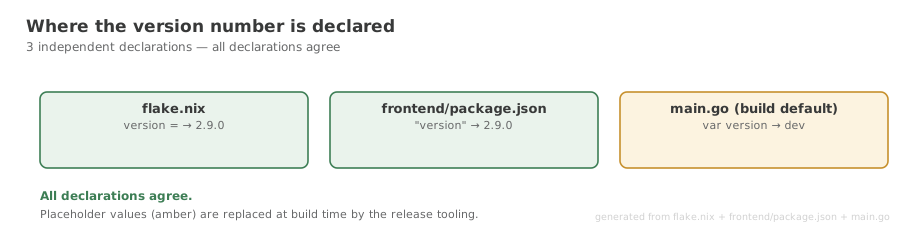
flake.nix, frontend/package.json and main.go. This diagram turns green by itself once the declarations agree. Version is not defined in one place
flake.nix and frontend/package.json carry independent version fields and can drift — they disagree at time of writing. main.go defaults to "dev", so any build outside Nix or CI reports vdev. Step 2 exists to work around this; it should become unnecessary.
Ticket: Version drifts across five sources of truth.
nix flake check does not currently pass
This step previously read "run nix flake check". That check cannot succeed: the frontend-tests check has an empty npmDepsHash, and go-tests omits the webkit build inputs. Use dt test-all until this is fixed.
Ticket: flake.nix embeds code inline and nix flake check cannot pass.
No CHANGELOG.md yet
Step 6 describes the intended process. CHANGELOG.md does not exist yet; releases currently rely on GitHub's auto-generated notes. Ticket: No CHANGELOG.md.
Nix Build
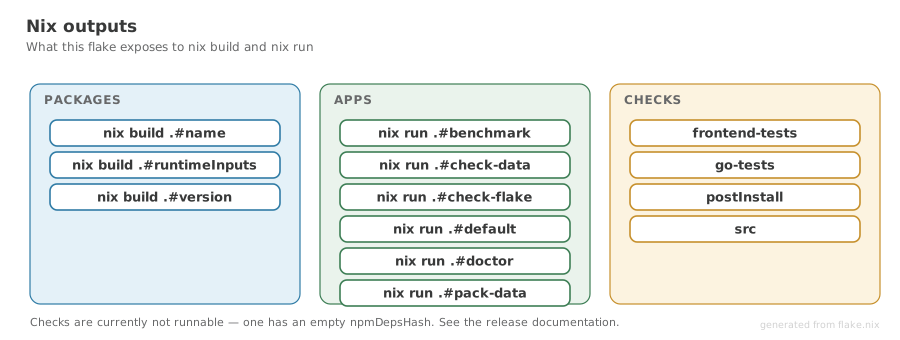
flake.nix, so new outputs appear here automatically. For Nix users, nix build always produces a current build from source. The Nix flake version is set in flake.nix and should be updated to match the Git tag for releases.
Users can install directly: nix profile install github:kartoza/DecisionTheatre