Scenario: Analyst Locked-Down Session¶
A single analyst — bob — is granted access to a QGIS desktop that can talk
to one Postgres/PostGIS database (db) and nothing else. Copy/paste is
disabled, screenshots are watermarked, and the container is fenced off from
the general internet.
This document describes what the scenario enforces, how it is wired up, and how to run and verify it end-to-end.
1. Requirements¶
| # | Requirement | How the container satisfies it |
|---|---|---|
| R1 | Only bob may sign in. | QGIS_DESKTOP_USERS=bob:password123 populates ~/.kasmpasswd; all other legacy accounts wiped on boot. |
| R2 | The browser must prompt for user + password. | HTTP BasicAuth is on by default; browser returns 401 WWW-Authenticate: Basic until valid creds are supplied. |
| R3 | Bob cannot copy data out of the desktop. | -SendCutText 0 (server → client). |
| R4 | Bob cannot paste data into the desktop. | -AcceptCutText 0 (client → server). |
| R5 | X primary selection (middle-click paste) is disabled. | -SendPrimary 0. |
| R6 | The desktop is visibly watermarked. | -DLP_WatermarkText "RESTRICTED - bob %H:%M". ${USER} is expanded to bob by start-desktop.sh before Xkasmvnc sees it; the separator is a hyphen because the default watermark font lacks U+2014. |
| R7 | The desktop can reach the db Postgres container. |
nftables allow rule for the resolved IP of db. |
| R8 | The desktop cannot reach the general internet. | Egress policy drop; no other allow rules. |
| R9 | If lockdown can't be enforced, the container must not start. | Entrypoint fails closed on missing NET_ADMIN. |
| R10 | Postgres is not reachable from the Docker host. | The db service has no published ports; both containers share a bridge network. |
| R11 | Bob gets a mapping application, not a shell. | QGIS_DESKTOP_ALLOW_TERMINAL=0 deletes the terminal emulators and the command-runner dialogs at boot, and strips the panel launcher and menu entries. See the caveat under Terminal access — it is an affordance control, not a sandbox. |
2. Deployment topology¶
Two containers on a private Docker bridge network. The analyst's browser is the only thing that touches the Docker host from the outside; Postgres has no host-visible port.
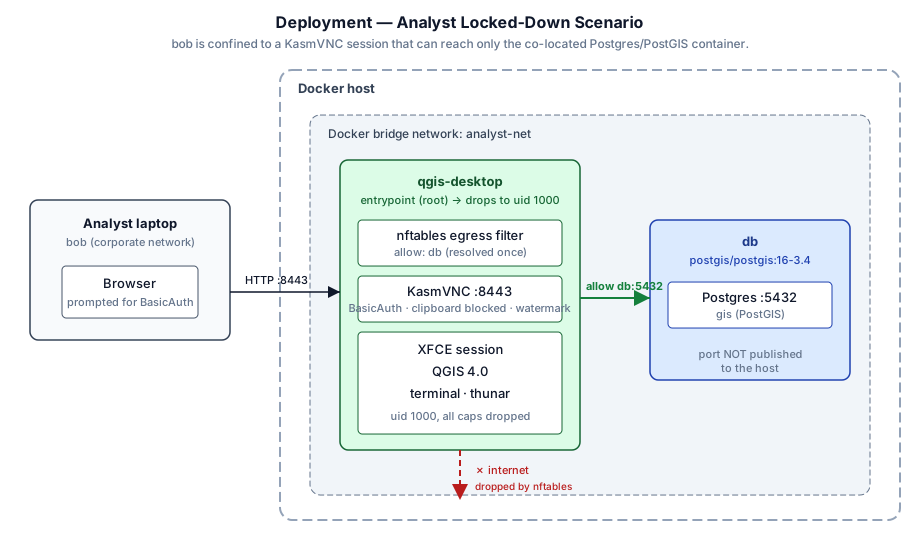
- Analyst laptop talks HTTP to the Docker host on
:8443. The connection carries HTTP BasicAuth credentials (bob / password123) before any VNC traffic flows. qgis-desktopboots as root just long enough for the entrypoint to install the nftables ruleset, then drops to uid 1000 with no inheritable or ambient capabilities.nftis not usable from that point on.dbispostgis/postgis:16-3.4(upstream) withPOSTGRES_USER=boband a matching password. It has noports:mapping — only containers onanalyst-netcan reach5432. See the box below for why we're not usingkartoza/postgishere.
Why not
kartoza/postgis? Somekartoza/postgistags hit moby/moby#35071 — bash's file-redirection insetup-conf.shfails withValue too large for defined data typewhen the container's writable layer is on XFS with 64-bit inodes. The upstreampostgis/postgisimage is a drop-in with different env var names (POSTGRES_PASSWORDinstead ofPOSTGRES_PASS,POSTGRES_DBinstead ofPOSTGRES_DBNAME) and the standard postgres volume mount at/var/lib/postgresql/data. If your host runs on ext4 and you'd rather usekartoza/postgis, swap thedb:block for the commented-out variant in the compose file.
3. Login and DB-connection flow¶
The sequence below covers the happy path (login + PostGIS query) and the two things the analyst is not allowed to do (copy out, reach the internet).
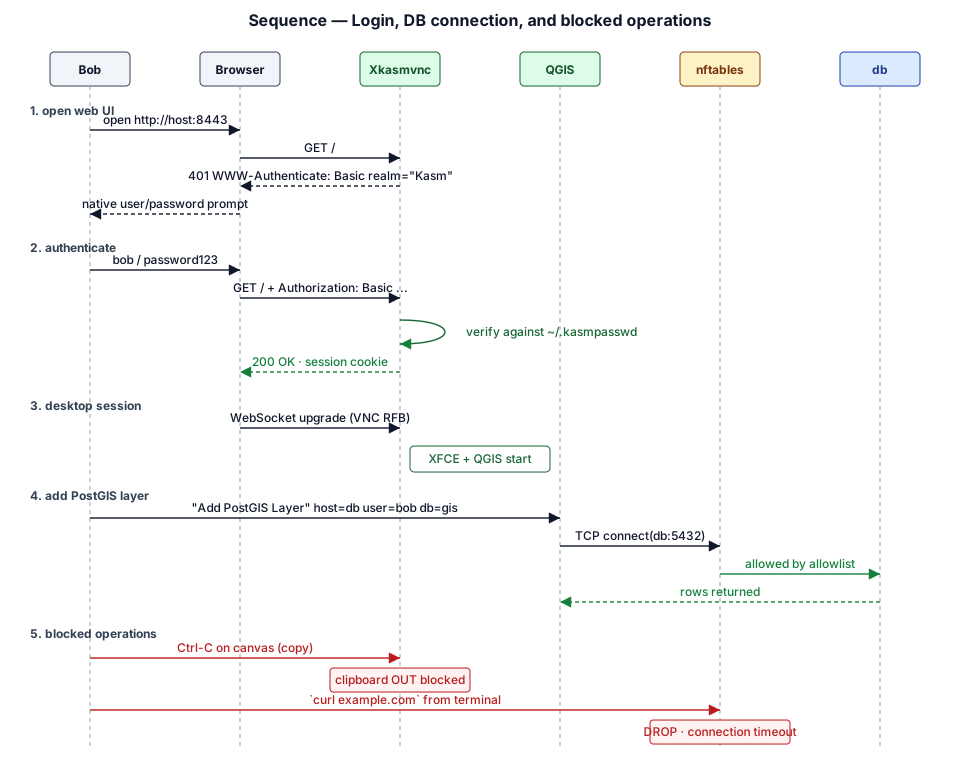
Notes on the sequence:
- The browser's HTTP BasicAuth credentials are reused transparently for the VNC RFB handshake, so bob only sees the browser's native user/password dialog once.
- The DB connect succeeds because the entrypoint resolved
dbto the IP that Docker assigned it onanalyst-netand inserted an nftablesacceptrule for that IP. - The clipboard block is enforced inside KasmVNC — the RFB
ClientCutTextandServerCutTextextensions are simply not exchanged. - The
curl example.comblock is enforced at the netfilter layer — the container's default OUTPUT policy isdrop, so the TCP SYN is discarded before it leaves the container's network namespace.
4. Container internals¶
Boot flow inside qgis-desktop. Everything above the dashed line runs as
root and exists only long enough to install the firewall; everything below
runs as uid 1000 with no ambient or inheritable capabilities.
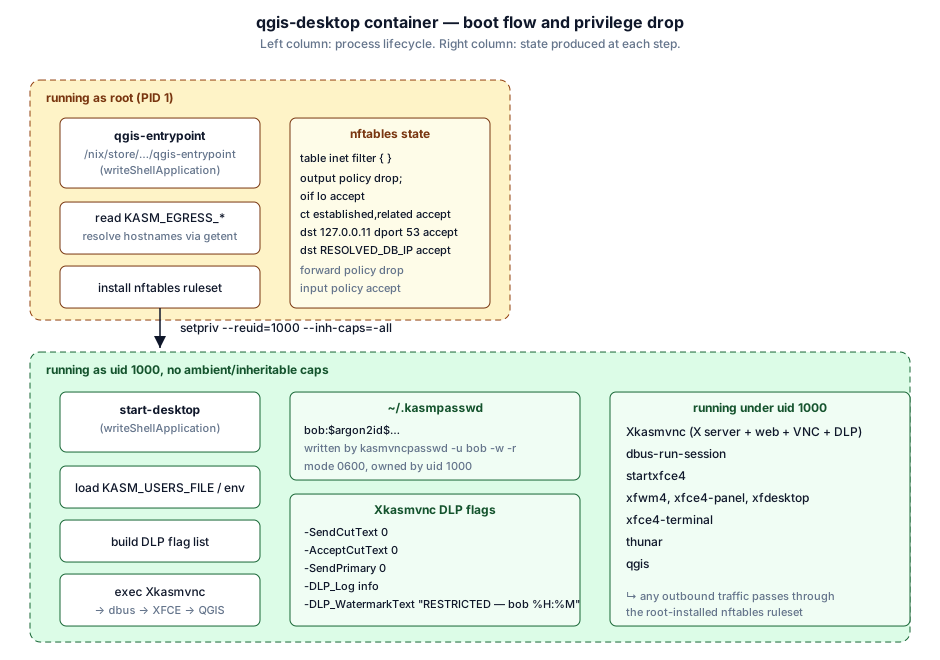
The setpriv invocation clears NET_ADMIN from the inheritable set, so the
QGIS process (and any child it spawns — the terminal, a plugin, whatever)
cannot alter nftables, even though the container has the NET_ADMIN
capability at the OCI level.
5. The docker-compose.yml¶
The file lives at examples/analyst-locked-down/docker-compose.yml. The key
sections:
services:
  qgis-desktop:
    image: kartoza:qgis-desktop-ltr        # locally built (see §6)
    cap_add: [NET_ADMIN]               # required for nftables setup
    environment:
      - QGIS_DESKTOP_USERS=bob:password123     # single-user auth
      - KASM_ALLOW_CLIPBOARD_IN=0
      - KASM_ALLOW_CLIPBOARD_OUT=0
      - KASM_ALLOW_PRIMARY_SELECTION=0
      - KASM_WATERMARK_TEXT=RESTRICTED - $${USER} %H:%M
      - KASM_DLP_LOG=info
      - QGIS_DESKTOP_ALLOW_TERMINAL=0          # no shell for bob
      - QGIS_DESKTOP_EGRESS_LOCKDOWN=1
      - QGIS_DESKTOP_EGRESS_ALLOW=db           # resolved once at startup
    ports: ["8443:8443"]
    networks: [analyst-net]

  db:
    image: postgis/postgis:16-3.4       # upstream — see note above
    environment:
      - POSTGRES_USER=bob
      - POSTGRES_PASSWORD=password123
      - POSTGRES_DB=gis
    # no `ports:` — DB is not reachable from the host
    networks: [analyst-net]

networks:
  analyst-net:
    driver: bridge
Notes:
$${USER}in the watermark is a compose-level escape. Compose collapses it to${USER}, which the container passes to KasmVNC verbatim, which evaluates it at draw time.depends_on: db.condition: service_healthyis set in the full file so QGIS doesn't come up before Postgres is accepting connections.
6. Running the scenario¶
One command via nix run¶
run-analyst-scenario writes the compose file to a temp directory, runs
docker compose up, and tears both containers down on Ctrl-C. Both the
locally-built image and kartoza/postgis must already be pullable.
Or run the compose file directly¶
Wait for Auth: ENABLED — 1 user(s) loaded from QGIS_DESKTOP_USERS env and
Egress lockdown: ACTIVE (1 allowlist entries) to appear in the logs, then
open http://localhost:8443. The browser will prompt for credentials; enter
bob / password123.
7. Verification checklist¶
Once logged in, work through this checklist to confirm every requirement is enforced:
The desktop has no terminal in this scenario (R11), so the checks that need a
shell are run from the host with docker exec — which is exactly the
asymmetry the scenario is after: the operator has one, bob does not.
| Test | Expected result |
|---|---|
| Enter wrong password at the browser prompt. | Browser re-prompts; Auth: log line unchanged in the container. |
| Right-click on the QGIS canvas → try to copy features. | Nothing lands on the local clipboard. |
| Copy text inside the desktop, then Ctrl-V into a local application. | Local paste is empty (blocked). |
| Look at the desktop background. | Watermark reads RESTRICTED - bob HH:MM. |
| In the desktop: panel launcher, applications menu, Ctrl-Alt-T, and Thunar → right-click → Open Terminal Here. | No terminal launcher or menu entry; the remaining routes fail to start anything. |
In QGIS: Layer → Add Layer → Add PostGIS Layer with host=db, db=gis, user=bob, password=password123. |
Connection succeeds; PostGIS tables listed. |
From the host: docker exec qgis-desktop curl -m5 https://example.com. |
Hangs, then Connection timed out. |
From the host: docker exec qgis-desktop getent hosts db. |
Resolves — DNS is allowed. |
From the host: docker exec -u 1000 qgis-desktop nft list ruleset. |
Operation not permitted (capabilities dropped for the desktop user). |
From the host: docker exec qgis-desktop nft list table inet qgis_desktop_egress. |
Output chain policy drop plus the db allow rule. |
8. Troubleshooting¶
ERROR: QGIS_DESKTOP_EGRESS_LOCKDOWN=1 but the container cannot manage nftables rules
The container started without NET_ADMIN. Add cap_add: [NET_ADMIN] in
compose or --cap-add=NET_ADMIN on docker run. If you deliberately want
unrestricted networking, set QGIS_DESKTOP_EGRESS_LOCKDOWN=0.
QGIS PostGIS connection times out.
Check the entrypoint log for the line allow db -> <IP>. If db was not
resolved (Docker networks come up asynchronously), the container may have
started before the DB got an IP. In compose this is prevented by
depends_on: db.condition: service_healthy; if you use plain docker run,
start the DB first and wait for it before starting qgis-desktop.
bob can paste after all!
Confirm KASM_ALLOW_CLIPBOARD_IN is 0 in the effective env — the
container prints a Clipboard: in=0 out=0 primary=0 … line at startup. A
lingering per-user KasmVNC yaml at $HOME/.vnc/kasmvnc.yaml in the mounted
qgis-home volume can override the CLI flags. Wipe the volume with
docker compose down -v and try again.
analyst-db restart-loops with Value too large for defined data type.
This is the reason we ship the scenario using postgis/postgis and not
kartoza/postgis. If you switched to the kartoza variant and are hitting
this, your Docker storage driver is on XFS with 64-bit inodes and bash's
redirection in setup-conf.sh cannot open the config file. Either revert
to postgis/postgis:16-3.4 or move Docker's data root to an ext4
filesystem. Upstream tracking:
moby/moby#35071.
The DB IP changes and everything breaks.
QGIS_DESKTOP_EGRESS_ALLOW is resolved once. If you restart the DB container it may
be given a new IP; the analyst container's nftables rules will still point
at the old one. Restart qgis-desktop to re-resolve, or switch to a static
IP for the DB in the compose file.
9. Extending the scenario¶
- Multiple analysts. Swap
QGIS_DESKTOP_USERS=bob:password123forQGIS_DESKTOP_USERS=bob:pw1,alice:pw2,carol:pw3or bind-mount aQGIS_DESKTOP_USERS_FILE. - Multiple databases.
QGIS_DESKTOP_EGRESS_ALLOW=db,warehouse,10.0.5.0/24— the allowlist accepts IPs, CIDRs, and hostnames. - Auditing. Set
KASM_DLP_LOG=verbosefor full keystroke and clipboard content logging (⚠ legal review required — the log will contain typed passwords and any pasted content). - Session immutability. Mount
qgis-homeread-only, or drop the volume altogether, so bob's session is fresh on every start.