GAP MCP
The GAP platform exposes its tools (weather, advisory, spatial, agromet, and more) through a Model Context Protocol (MCP) server. MCP is a composable server pattern over standard HTTP and JSON: it presents capabilities as named, callable tools, so many kinds of client — reasoning agents, applications, and scheduled campaigns — can call the same governed capabilities through one contract. It is an architectural pattern rather than a dependency on any single vendor.
The MCP server is one protocol surface in the platform's interface layer, alongside the HTTP API. It is a door into the system, not the system itself: a tool handler validates a request, resolves the tenant, and delegates inward, but never computes an advisory itself. Every surface converges on the same pipeline, so an advisory cannot differ by the door it came through.
Learn more:
- Tools and handlers — the contract a caller sees versus the code that services it.
- Calling a tool — a generic walkthrough of a single tool call.
- GAP Agentic architecture — where MCP sits in the layered platform.
Connecting GAP MCP to Claude.ai
You can connect this server to Claude.ai as a custom connector, which lets Claude call GAP tools directly during a conversation.
This guide walks through adding the GAP MCP connector in the Claude.ai browser app and authorizing it with your GAP account.
-
Open the Connectors settings
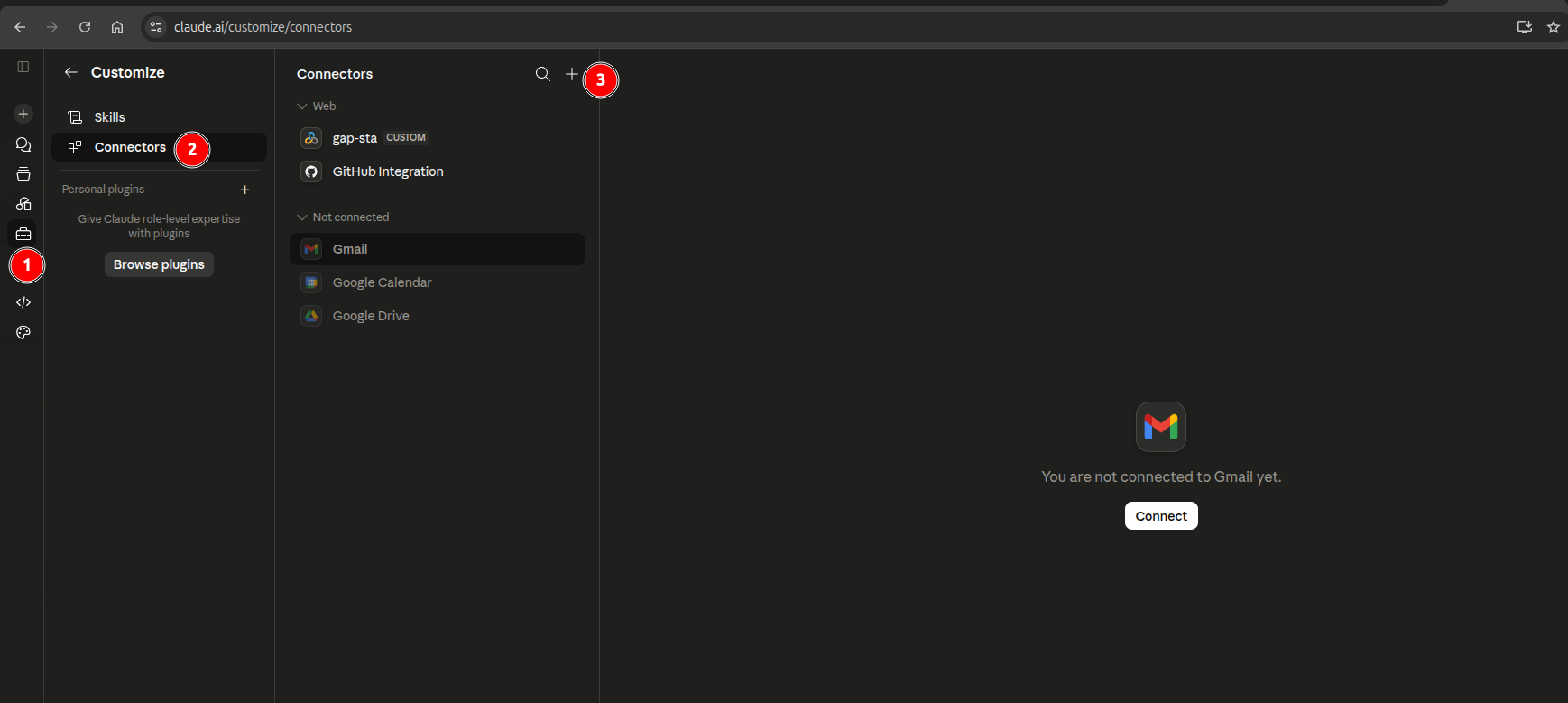
In Claude.ai, click the Settings icon 1️⃣ in the left sidebar, then select Connectors 2️⃣ from the Customize menu. Click the + button 3️⃣ to add a new connector.
-
Add a custom connector
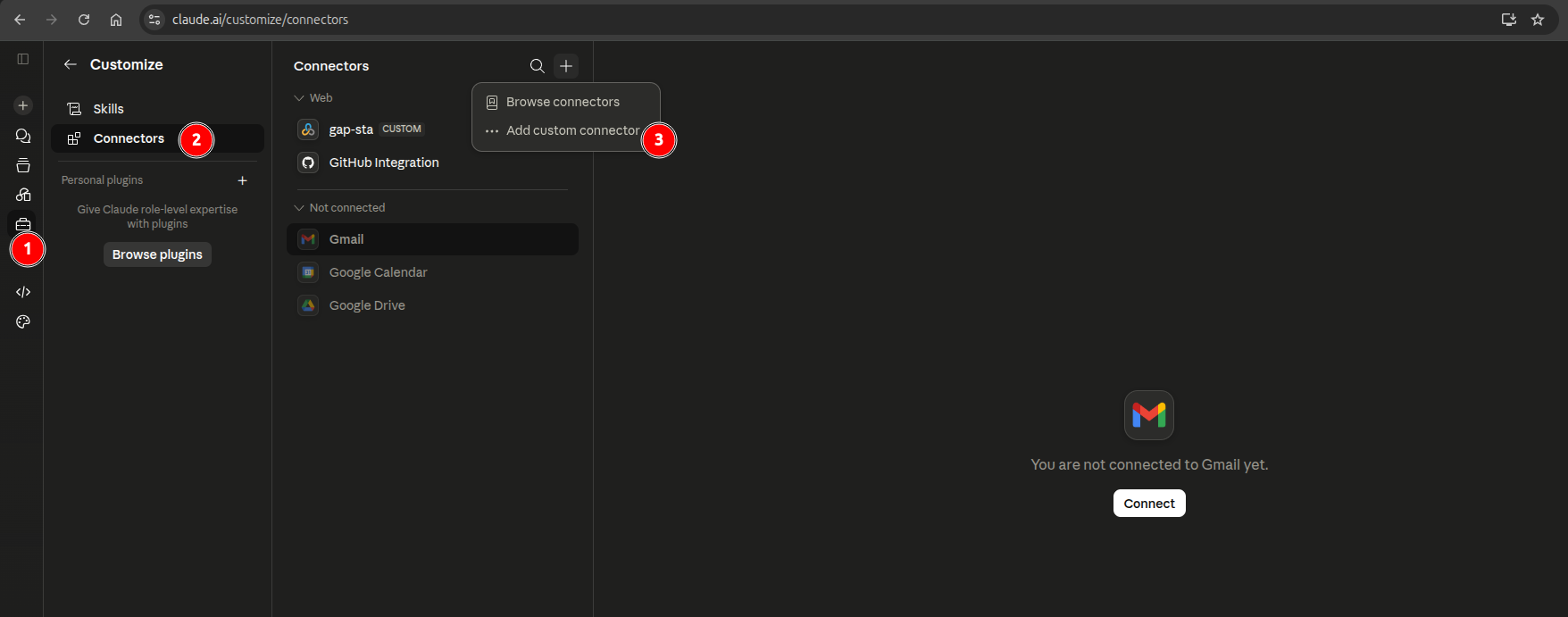
From the dropdown menu, choose Add custom connector 3️⃣.
-
Enter the GAP MCP details
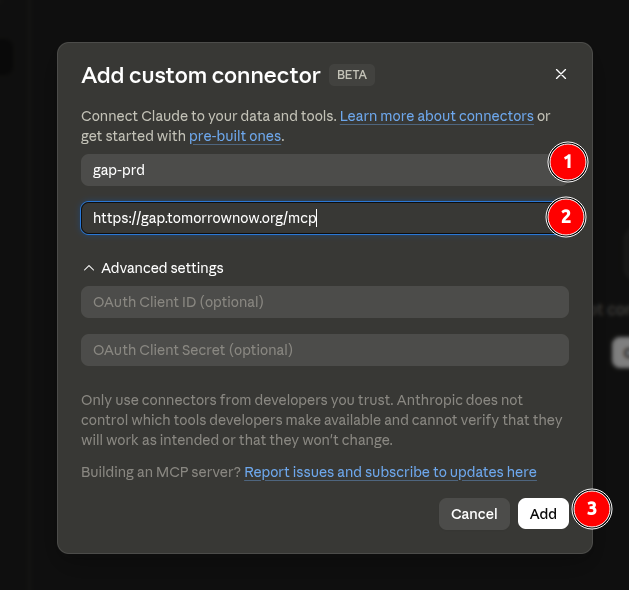
In the Add custom connector dialog:
- Give the connector a name 1️⃣, for example
gap-prd. - Enter the GAP MCP server URL 2️⃣, for example
https://gap.tomorrownow.org/mcp. - Leave OAuth Client ID and OAuth Client Secret under Advanced settings empty — the GAP MCP server handles authorization automatically in a later step.
- Click Add 3️⃣.
- Give the connector a name 1️⃣, for example
-
Connect the new connector
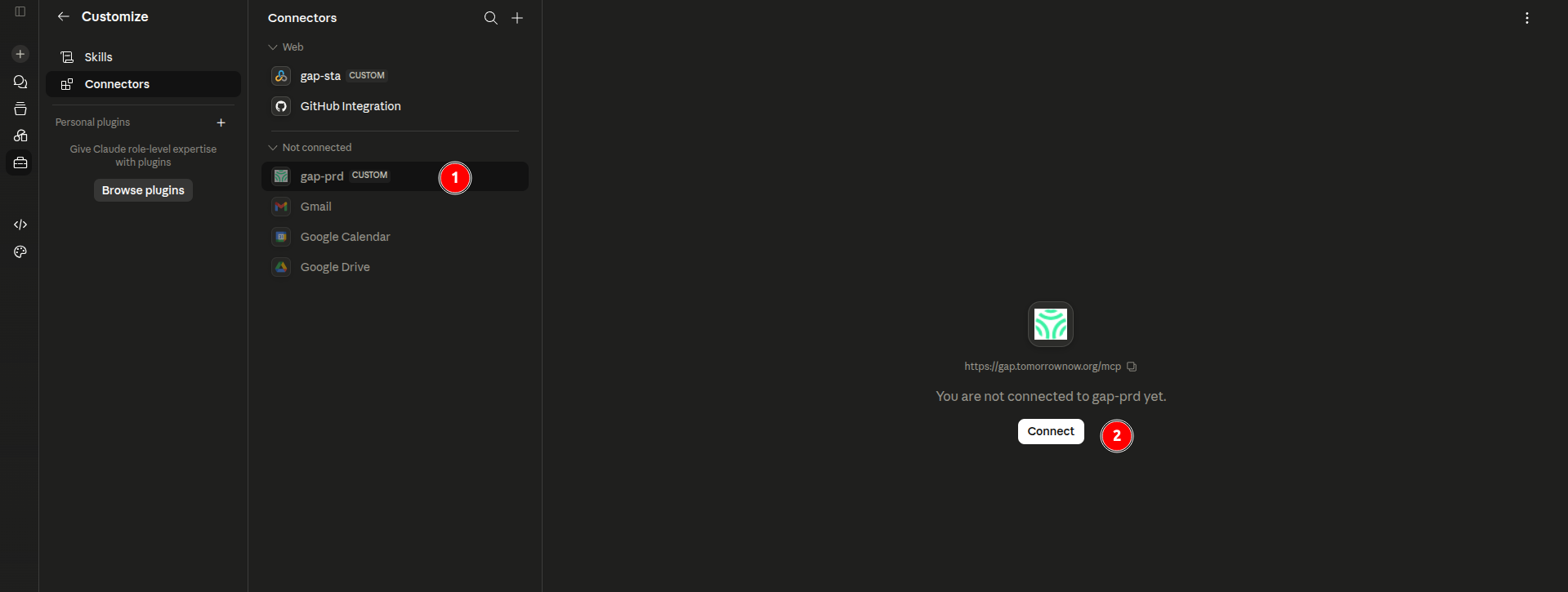
The connector now appears in the list under Not connected 1️⃣. Click Connect 2️⃣ to start authorization.
-
Sign in to GAP
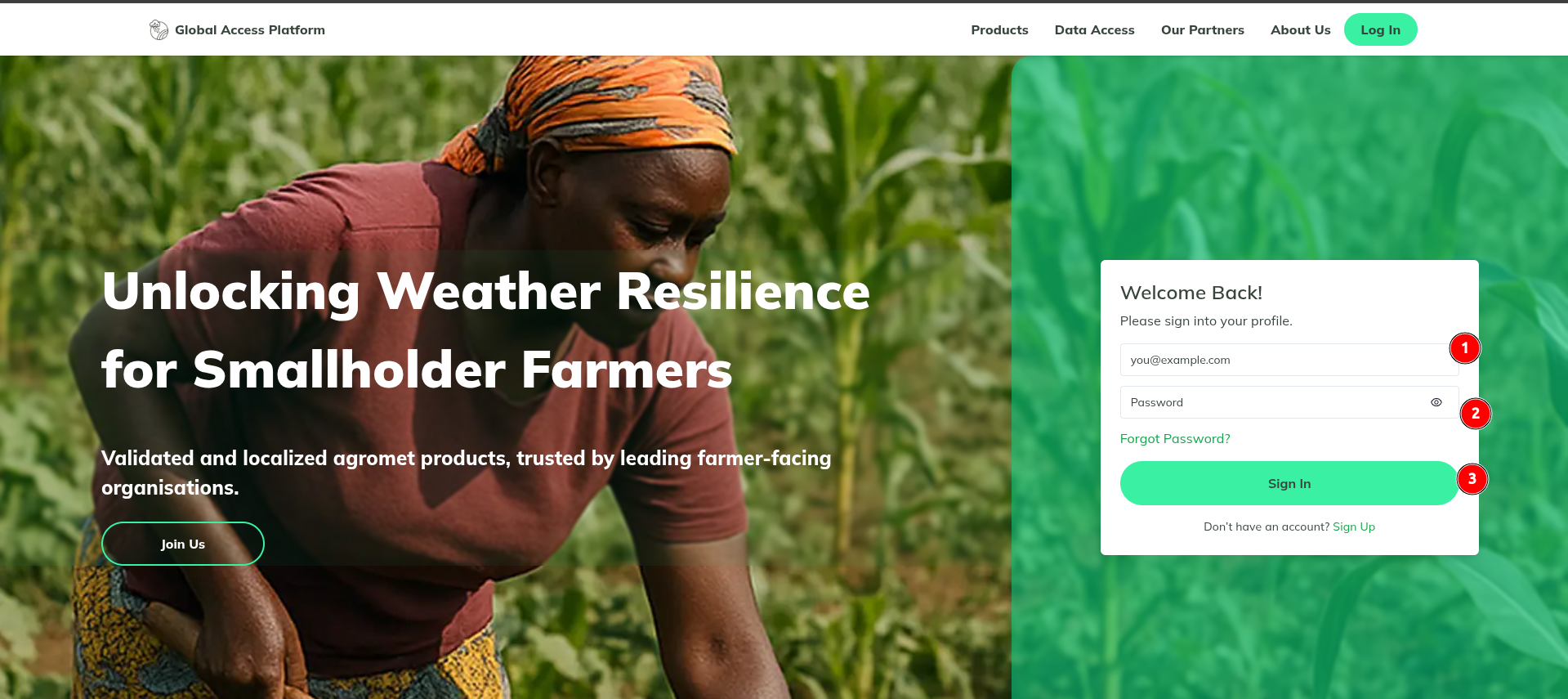
You will be redirected to the GAP Global Access Platform login page. Enter your registered email 1️⃣ and password 2️⃣, then click Sign In 3️⃣.
-
Authorize Claude
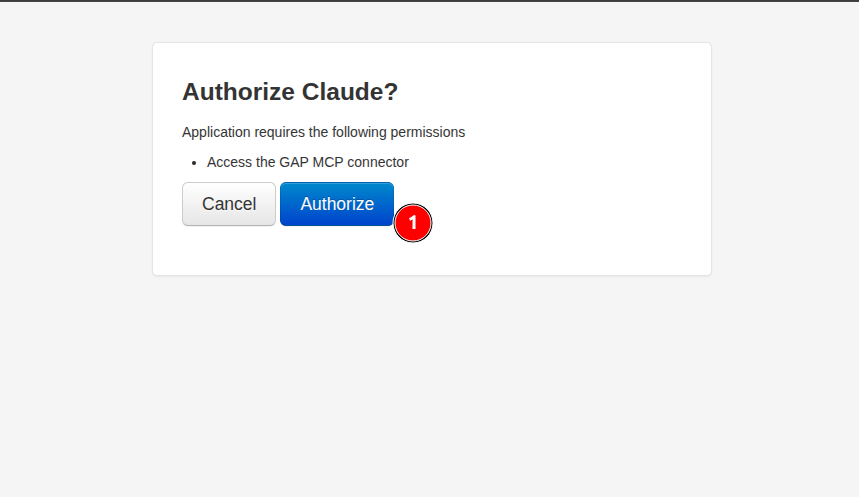
GAP will ask you to confirm that Claude may access the GAP MCP connector. Click Authorize 1️⃣.
-
Confirm the connection
You are returned to Claude.ai with a Connected to gap-prd confirmation 1️⃣. Below the connector details, the Tool permissions list shows every GAP tool exposed by the MCP server (over 100 tools, such as
gap_advisory_crop_suitability,gap_agromet_calculate_indices, andgap_weather_get_forecast). For each tool you can choose whether Claude is always allowed to use it, must ask first, or is never allowed to use it.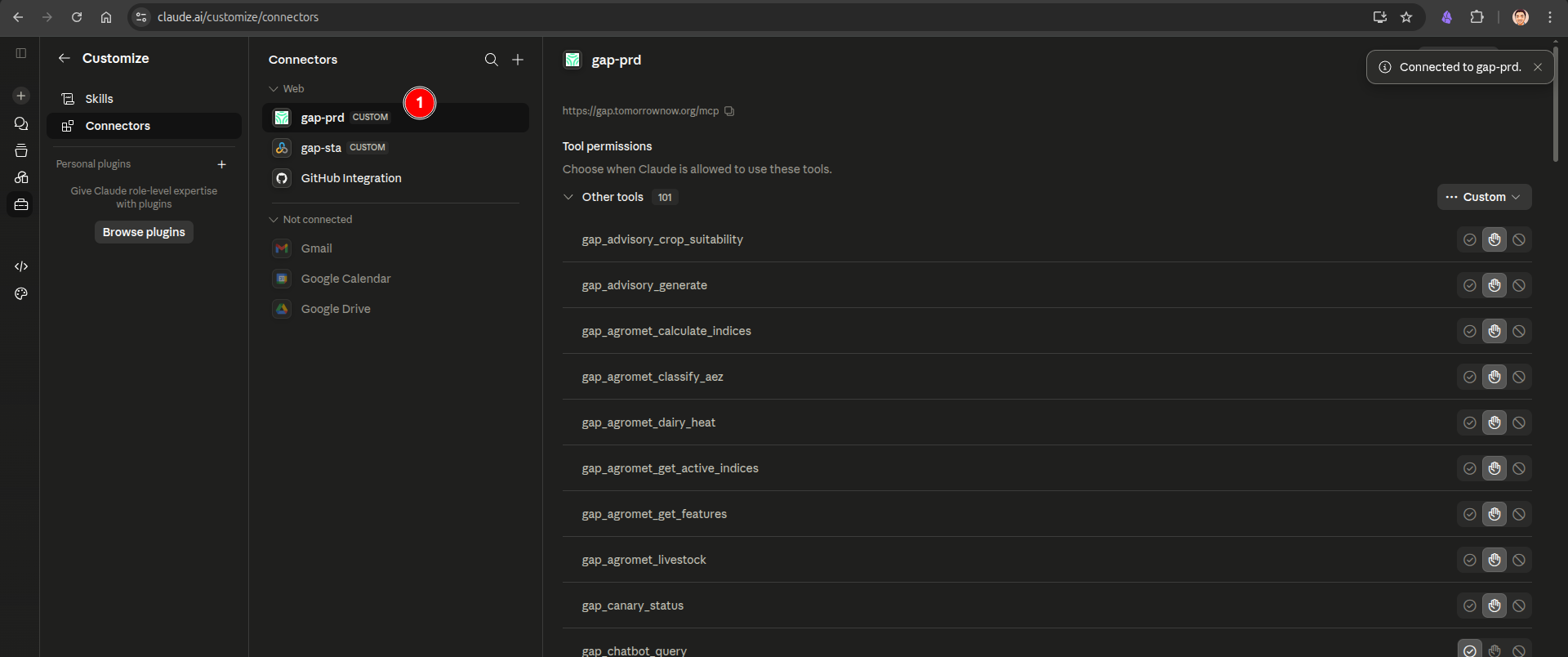
Once connected, the GAP tools become available to Claude in any conversation — start a new chat and ask a GAP-related question (for example, a weather forecast or crop advisory) to see Claude call the connector.
Sample Prompts to Try
You don't need to know the exact tool names — speak naturally and mention the location, the crop (if relevant), and what you want to do with the answer (e.g. "for a radio bulletin" or "as an SMS"). Claude picks the right GAP tools for you. Here are some prompts to get started:
| # | Domain | Example Prompt |
|---|---|---|
| 1 | Weather | "What's the weather in Kisumu this week?" |
| 2 | Land Preparation | "Is it safe to plant maize near Bomet?" |
| 3 | Crop Protection | "Can I spray tomorrow morning? I'm near Nakuru." |
| 4 | Nutrient Management | "Best day to apply urea this week in Chipata?" |
| 5 | Harvest | "When can we harvest near Homa Bay? Need 3 dry days." |
| 6 | All Domains | "Give me a complete farm advisory for Njoro, maize, vegetative stage." |
| 7 | Land Preparation | "Compare planting conditions at these 5 locations: [lat/lon list]" |
| 8 | Delivery | "Create an SMS in Swahili for farmers to wait before planting." |
| 9 | Validation | "How are our forecasts performing for Kenya this month?" |
| 10 | Validation | "Which weather model is most accurate for Zambia right now?" |
| 11 | Hazards | "Check heat stress conditions for dairy cows near Kiambu." |
| 12 | Crop Monitoring | "What agro-ecological zone is -1.2, 36.8?" |
| 13 | Weather | "Write a 200-word weather bulletin for Western Kenya radio." |
| 14 | All Domains | "Generate a DCAS synthesis for maize near Njoro with confidence scoring." |
| 15 | Data Quality | "Were there any data quality issues in this week's Kenya advisories?" |
Tips for better conversations:
- Start simple, then drill down. Ask a broad question first, then follow up on the details that matter.
- Mention your location. City names work; coordinates are even better.
- Say what crop and stage. "Maize in vegetative stage" gives different advice than "beans at planting."
- Follow up freely. Claude remembers your conversation, so you don't need to repeat location or crop details.
- Ask "why." If a recommendation surprises you, ask why — Claude will show the underlying data and thresholds.