63. Sharing Biodiversity Modules Across BIMS Instances (Read-Only)
This section explains how to share biodiversity modules (species taxon groups) between BIMS instances in read-only mode. It is written for site administrators and taxonomic experts who manage species modules.
63.1 Overview
A BIMS instance can import validated species from another upstream BIMS instance and keep them in sync. When a local module is marked read-only, its species are managed exclusively by the upstream instance:
- Species in the module cannot be edited locally.
- The module is bound to a single upstream source (URL + remote group ID).
- Re-harvesting is only allowed from that same source.
- Ownership and edit restrictions from upstream are preserved.
This lets a network of BIMS sites share a common, authoritative taxonomy while preventing accidental local changes that would diverge from the source.
Who can do this? Access to the harvester requires the
bims.can_harvest_species permission. Users without it cannot open the harvest
page or the supporting APIs.
63.2 Key concepts
| Term | Meaning |
|---|---|
| Upstream instance | The remote BIMS site that acts as the authoritative data source. |
| Taxon group / module | A species module (category SPECIES_MODULE) that groups taxa. |
| Read-only group | A local module whose species are managed by harvesting and cannot be edited locally. |
| Harvest | The process of importing/updating species from the upstream instance. |
| Upstream binding | The upstream_url + upstream_id pair that ties a read-only group to one remote source. |
63.3 Step-by-step: sharing a module in read-only mode
Open the harvester from the admin menu (Harvest BIMS Species, at
/harvest-bims/).
63.3.1 Step 1 - Enter the upstream BIMS URL
Type the base URL of the upstream instance (for example
https://freshwaterbiodiversity.org) and click Fetch Taxon Groups. BIMS
contacts the remote instance and lists the species modules available there.

63.3.2 Step 2 - Select the remote taxon group
Choose the module you want to share from the dropdown. This is the module on the upstream instance whose species will be imported.

63.3.3 Step 3 - Choose the import mode
- Use existing taxon group - import the remote species into a local module you already have.
- Import as new taxon group - create a new local module using the remote group's name. This is the usual choice when setting up a shared module for the first time.

63.3.4 Step 4 - Mark the module as read-only
When importing as a new taxon group, tick Mark as read-only. This binds the new module to the upstream source and prevents local editing of its species.

If you selected Use existing taxon group and that group is already read-only, BIMS shows an information banner confirming the upstream source the group is bound to (see 63.4 Read-only indicators).
63.3.5 Step 5 - Start harvesting
Click Start harvesting. A live progress panel shows the harvest log and a running status. You can click Cancel at any time to stop.
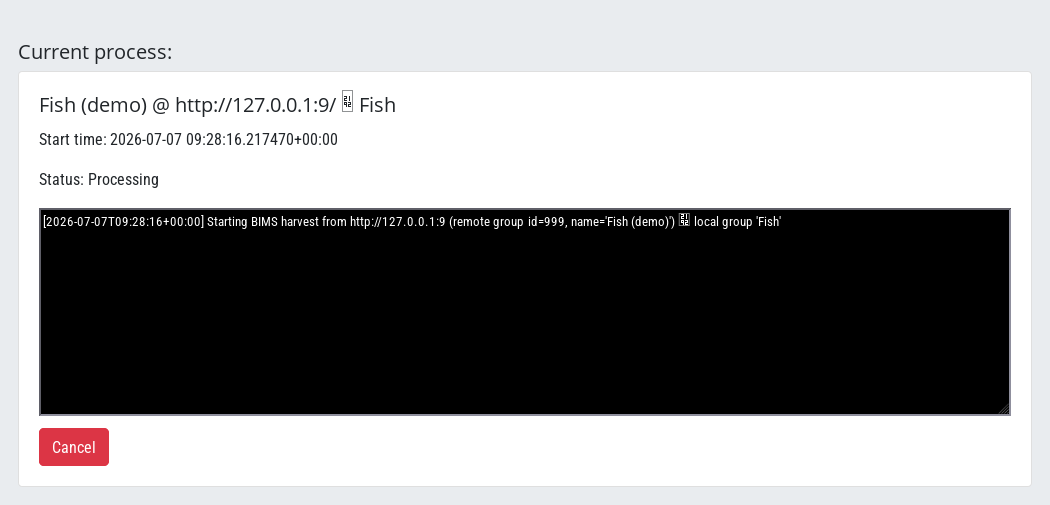
When the harvest finishes, the new module and its validated species are available locally, in read-only mode.
63.4 Read-only indicators in the UI
Read-only modules are clearly marked throughout the interface.
In the local taxon group dropdown, read-only groups show a [read-only]
label next to their name. When you select one, an information banner appears
naming the upstream source it is bound to:

Source mismatch warning. If you try to harvest a read-only group from a different upstream URL or group ID than the one it is bound to, BIMS warns you before you start and the harvest will be rejected:

63.5 What read-only means for editing
Species that belong to a read-only module cannot be edited locally. If a user opens the taxon edit page for such a species, BIMS returns an HTTP 403 and shows an explanatory banner instead of the edit form. This applies to every user, including superusers and taxon-group experts, and blocks both viewing the edit form and saving changes.
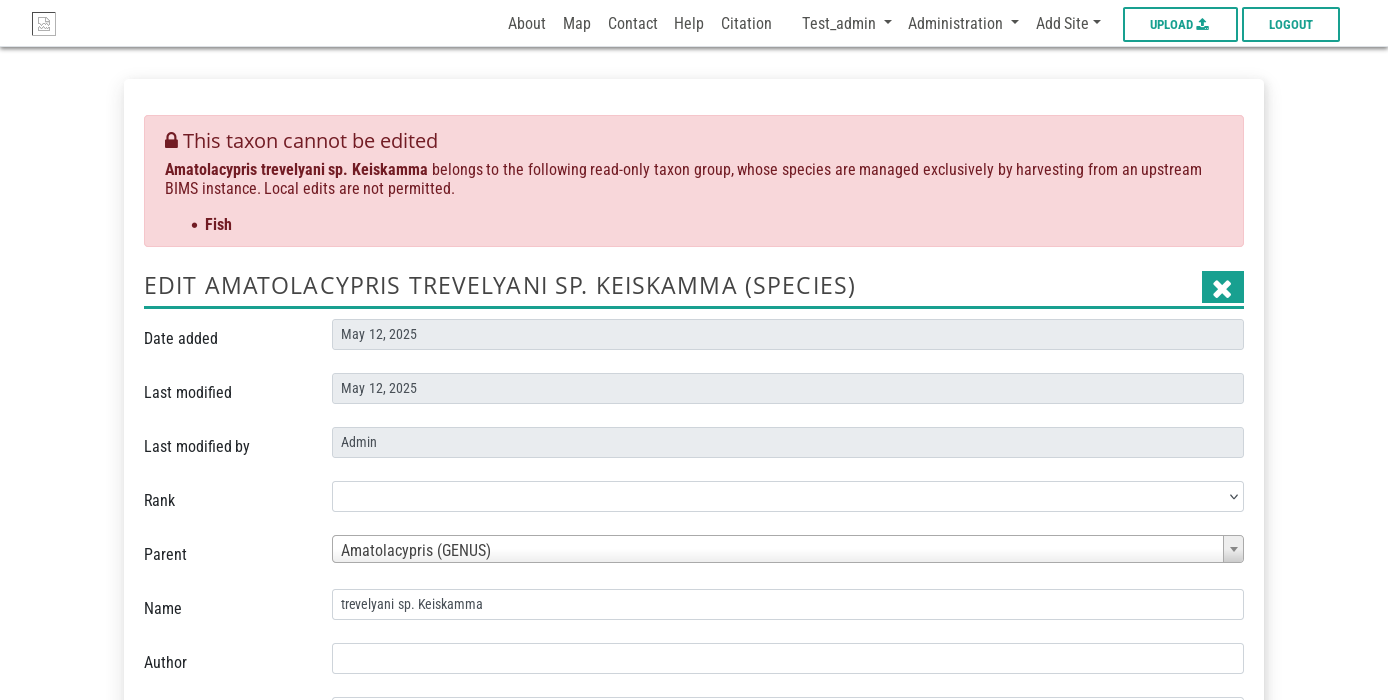
Because the block is based on the species' membership in any read-only group, a species shared into a read-only module stays protected even if it is also part of a normal local group.
63.6 Keeping shared modules in sync
63.6.1 Automatic monthly re-harvest
When a module is bound to an upstream source, BIMS schedules an automatic re-harvest on the 1st of each month. The UI confirms this with a schedule notice:

63.6.2 How updates are applied
On each re-harvest BIMS only touches what actually changed:
- Each remote species is fingerprinted (a checksum of its canonical fields). If the fingerprint is unchanged since the last harvest, the species is skipped and no writes happen. This keeps routine re-harvests fast.
- For read-only groups, the upstream instance is the source of truth. When a field differs, the upstream value wins and the change is recorded in the harvest log. For normal (non-read-only) groups, local values are preserved and the upstream only adds new information.
- Tags are always additive - existing local tags are never removed.
63.6.3 Ownership and edit restrictions
Read-only mode preserves the intent of the upstream instance: local users cannot alter shared species, so the upstream owner's data stays authoritative. Only validated taxa are imported, so unreviewed upstream records do not leak into the shared module.
63.7 Managing bindings in the Django admin
Administrators can inspect or adjust a module's read-only binding directly on the TaxonGroup record in the Django admin. The relevant fields are:
| Field | Purpose |
|---|---|
is_readonly |
Blocks local editing of the module's species when enabled. |
upstream_url |
Base URL of the upstream BIMS instance. |
upstream_id |
ID of the corresponding taxon group on the upstream instance. |
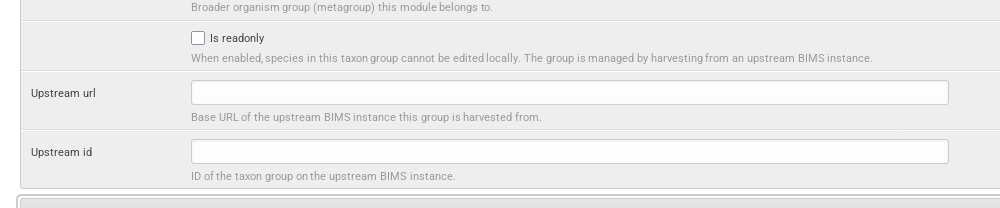
Setting is_readonly here (together with upstream_url and upstream_id) is an
alternative to the Mark as read-only checkbox in the harvester, useful for
retrofitting an existing module.
63.8 Troubleshooting
| Symptom | Likely cause | What to do |
|---|---|---|
| "Source mismatch" warning before harvesting | The read-only group is bound to a different upstream URL/ID than the one entered. | Harvest from the bound source, or update the binding in the admin if the upstream moved. |
| Harvest aborts with "upstream source mismatch for read-only group" | Same as above, detected server-side. | Confirm upstream_url/upstream_id match the source you are harvesting from. |
| Cannot edit a species (403) | The species belongs to a read-only module. | This is expected. Edit it on the upstream instance; changes flow down on the next harvest. |
| Species missing after harvest | Only validated taxa are imported. | Validate the taxon on the upstream instance, then re-harvest. |
| Harvest page not accessible | Missing bims.can_harvest_species permission. |
Ask an administrator to grant the permission. |