Storage modes
Every storage mode erases the disk
Whichever layout you choose, the installer wipes the target disk completely — all existing data is destroyed and cannot be recovered. Back up first, and choose the disk carefully. GISNIX and Kartoza accept no responsibility for lost data.
The installer offers three storage modes, all built from the same disko
templates under templates/disko/ (see
Architecture for how a host's disks.nix
picks one).
| Mode | Encryption | Disks | Notes |
|---|---|---|---|
| ZFS, single disk | AES-256-GCM, passphrase at boot | 1 | The installer's default |
| XFS, single disk | None | 1 | Maximum performance, dual-boot friendly |
| ZFS, multi-disk | Optional (on by default) | 2+ (stripe), 3+ (raidz), 4+ (raidz2) | Redundancy across disks |
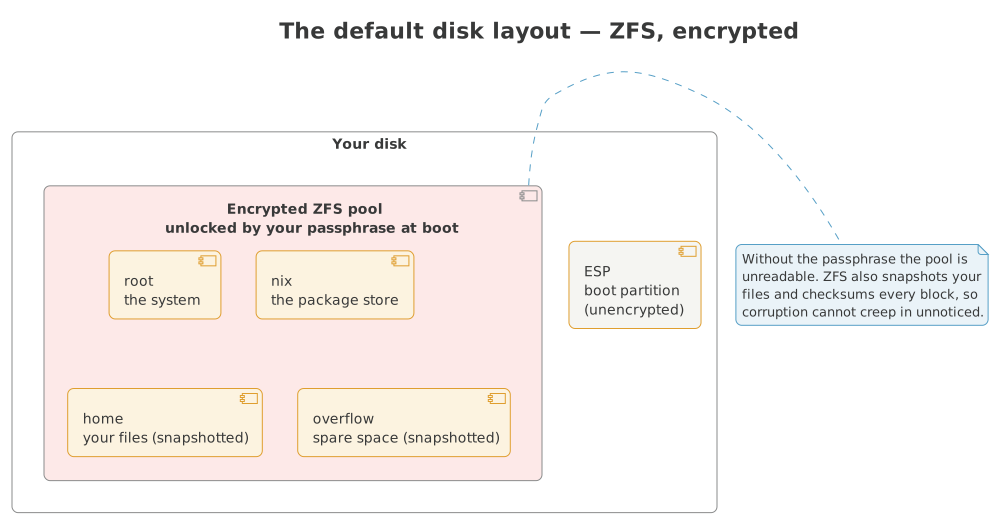
The default — an encrypted ZFS pool on a single disk — lays out separate datasets for the system, the package store, your home and spare space:
The ZFS dataset layout
Every ZFS mode (single or multi-disk) uses the same dataset shape:
NIXROOT/
├── root      (/)           root filesystem
├── nix       (/nix)        nix store, quota-limited
├── home      (/home)       user data
├── overflow  (/overflow)   extra storage
└── atuin     (/var/atuin)  shell history, XFS zvol
The shape is the same whether a machine was installed fresh by GISNIX or migrated onto it by hand.
Changing your mind after install
The storage mode itself isn't changeable after install — disks.nix
describes how the disk was partitioned, not a knob nixos-rebuild can turn.
Changing it means reinstalling (the installer's "existing host profile"
option, pointed at your hosts/<name>/, does this cleanly — it's the same
config, freshly partitioned).
That includes dataset properties, not just the disk layout: disko sets
quotas, compression and the rest at partition time, once, when the pool is
created. Editing the numbers in disks.nix afterwards and running
nixos-rebuild switch changes nothing on disk — disko doesn't run again,
nixos-rebuild never re-invokes it, and the edit becomes a lie about the
pool's actual state the moment you make it without also touching the pool
by hand. To actually raise a quota on a live pool: zfs set quota=<size>
<pool>/<dataset> as root, then update disks.nix to match, purely as a
record of what's true. What is genuinely changeable without reinstalling:
the software on top of the storage — see
Software bundles.