After the install
The install left you with a running machine and one small folder that
describes it: ~/nixos-config. Everything about this computer — which
software it carries, its keyboard, its disks, and which GISNIX it follows —
is written down there. You change the machine by editing those files and
rebuilding; nothing is configured by clicking around and hoping it sticks.
This page covers the first things worth knowing once you are logged in: where your machine is described, how to decide which GISNIX it follows, and how to apply a change.
Where your machine is described
Two files matter to begin with, both under ~/nixos-config:
hosts/<your-hostname>/config.nix— the software your machine has. You rarely edit this by hand;gisnix configureopens a menu that writes your answers back into it.flake.nix— the machine's outermost wrapper. Among a few other things, it names which GISNIX this machine is built from. That single line is the subject of the next section.
Choosing how you follow GISNIX
GISNIX keeps moving — new hardware support, new software, fixes. Your machine
does not have to move with it in lockstep. One line in flake.nix decides
how new GISNIX reaches you, and you get to choose the character of your
machine: steady, or always-newest.
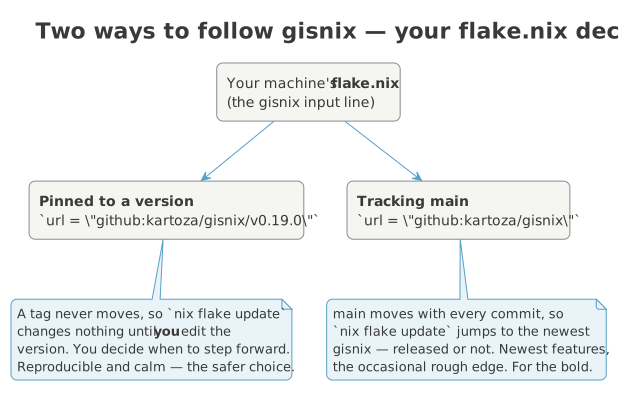
Open ~/nixos-config/flake.nix and find the GISNIX input. It reads one of
two ways.
Pinned to a version — the calm, reproducible choice, and the one we recommend:
A version tag never moves. Running nix flake update against a pinned input
changes nothing, because the tag it points at is fixed forever. Your machine
stays exactly as it is until you decide to step it forward — by editing the
version number to the next release and rebuilding. You read the release notes
first, you move when it suits you, and if a release ever misbehaves you know
precisely which one you are on.
Tracking main — the bleeding edge, for those who like it fresh:
With no version on the end, the input follows GISNIX's main branch, which
advances with every commit — including work that has not been cut into a
release yet. Now nix flake update really does move you: each time you run
it, your next build is on the newest GISNIX there is. You get features the
moment they land, at the price of the occasional rough edge.
You can change your mind at any time
Switching is a one-line edit followed by a rebuild. Pin today for a quiet
life; track main for a week when you want a fix that has not been
released yet; pin again afterwards. Whichever you choose, the
flake.lock file beside your flake.nix records the exact GISNIX commit
each build used, so any single build is always reproducible — the choice
above only changes what the next update resolves to.
Moving to a newer pin
Because a tag is immutable, bumping a pinned version is two steps, not
one: edit the version in flake.nix first, then run the update so the
lock can follow.
Applying a change
However you follow GISNIX, the loop for changing your machine is the same, and it is a single command:
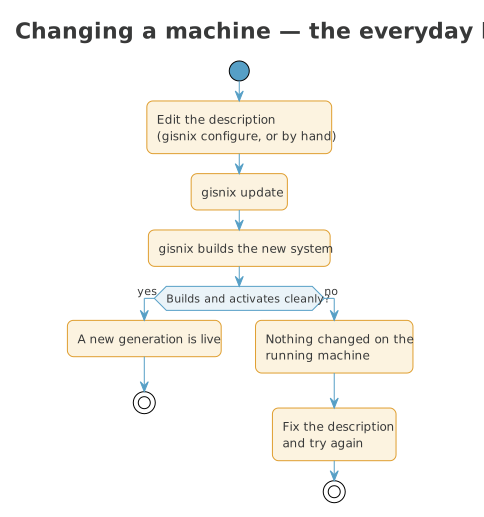
gisnix update builds a new version of the whole system from your
description and, if it builds cleanly, switches to it. Add --flake when you
also want to pull in newer inputs (a newer GISNIX, on whichever tracking you
chose) as part of the same step:
If a build fails, nothing on your running machine changes — you are left exactly where you were, free to fix the description and try again.
Getting a GISNIX update
GISNIX keeps improving upstream — bug fixes, new hardware support, new software. When a fix is published, pulling it onto your machine is one command:
--flake refreshes the flake inputs — GISNIX among them — in flake.lock,
then rebuilds. What it actually pulls depends on how you follow GISNIX (see
above):
- Tracking main —
gisnix update --flakegives you the newest GISNIX there is, every time. A fix published upstream is yours on the next run. -
Pinned to a version — the pin holds you steady, so
--flakemoves nothing until you bump the version inflake.nixfirst. When a release is announced with a fix you want, edit the version, then update:
If you want only GISNIX to move and everything else to stay put,
gisnix update --flake=gisnix updates that one input and rebuilds. The
flake.lock change is left staged so you can see exactly what moved and
commit it (your ~/nixos-config is yours to keep under git).
If an update misbehaves
Every successful build becomes a generation — a complete, bootable snapshot of the system. The previous one does not go anywhere. If a new generation boots to trouble, you can pick the last good one from the boot menu and carry on as though nothing happened, then investigate at your leisure. This is the safety net that makes trying a newer GISNIX a low-stakes thing to do.
What's next?
- Post-install configuration — display scaling, the panel and dock, and the screenshot / GIF-recording shortcuts.
- Software bundles — choosing what your machine carries.
- Keyboard remapping — home-row modifiers, layers, and push-to-talk.
- Building your fleet — going from one machine to many.