CloudBench Overview
How It Works
CloudBench provides a central interface for connecting to geospatial services, managing data uploads, converting datasets, and previewing supported outputs.
Users begin by selecting a saved connection, such as an S3 storage bucket or GeoNode site. Depending on the connection type, they can upload datasets, manage available files, or perform operations supported by the connected service.
For supported file types, CloudBench can use CloudNativeGIS to convert the data into cloud-native formats. These outputs are stored in the connected bucket and registered in its catalogue, allowing supported layers to be previewed directly in CloudBench.
CloudBench Architecture
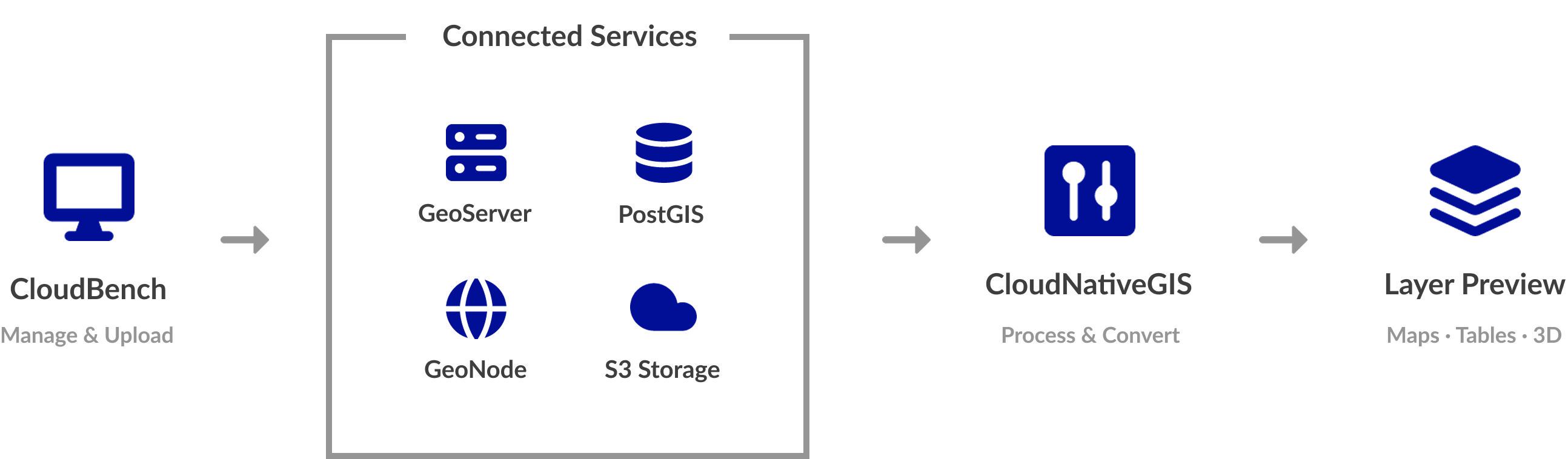
CloudBench consists of several components that work together to manage connections, process geospatial data, and make the resulting datasets accessible.
| Component | Purpose |
|---|---|
| CloudBench | Provides the interface for managing connections, uploading datasets, initiating conversions, and previewing supported outputs. |
| GeoServer | Provides access to connected GeoServer instances through their configured connection details. |
| PostgreSQL/PostGIS | Provides access to connected databases for working with spatial data stored in PostgreSQL with PostGIS enabled. |
| GeoNode | Provides a destination for uploading supported datasets and managing their metadata through the connected account. |
| S3 Storage | Stores uploaded datasets and published cloud-native outputs in an object storage bucket. |
| CloudNativeGIS | Processes supported datasets and generates cloud-native formats for storage and visualisation. |
| Layer Preview | Displays supported outputs directly in CloudBench as maps, tables, or 3D point clouds, depending on the format. |
Connections
A connection is a saved configuration that allows CloudBench to communicate with a specific external service or storage location.
Each connection points to one target, such as a GeoServer instance, a PostgreSQL database service, a GeoNode site, or an S3 bucket. Multiple connections of the same type can be configured for different targets.
The available connection types are:
| Connection Type | Purpose |
|---|---|
| GeoServer | Connects to a GeoServer instance using its URL and account credentials. |
| PostgreSQL/PostGIS | Connects to a PostgreSQL database using its host, port, database name, and credentials. |
| GeoNode | Connects to a GeoNode site for uploading datasets and updating their metadata. |
| S3 Storage | Connects to an object storage bucket using its endpoint, region, bucket name, and access credentials. |
Connections can be tested before they are saved. Their details can also be edited or removed from CloudBench. Removing a connection only removes its saved configuration; it does not delete the external service or its data.
Data Uploads and Processing
CloudBench supports different workflows depending on the selected connection.
- S3 Storage: Upload datasets to a connected bucket and, for supported formats, convert them into cloud-native outputs.
- GeoNode: Upload supported vector or raster datasets to a connected GeoNode site and provide a title and optional abstract.
- PostgreSQL/PostGIS and GeoServer: Connect to existing database and map-serving services through their configured connection details.
For S3 uploads, CloudBench detects supported input formats and presents the applicable conversion options. Processing is performed by CloudNativeGIS, and the resulting files are published to the bucket.
Cloud-Native Formats
CloudBench supports four primary cloud-native output formats. Each is designed for a different type of geospatial data and use case.
| Format | File Extension | Data Type | Primary Use |
|---|---|---|---|
| Cloud Optimized GeoTIFF (COG) | .tif |
Raster | Efficient access to imagery, elevation models, and other raster datasets. |
| PMTiles | .pmtiles |
Vector tiles | Displaying large vector datasets through tiled map visualisation. |
| GeoParquet | .parquet |
Vector features and attributes | Querying, filtering, and analysing feature data. |
| Cloud Optimized Point Cloud (COPC) | .copc.laz |
LiDAR point cloud | Streaming and visualising point cloud data in 3D. |
The output format depends on the uploaded data. Raster uploads can produce COGs, vector uploads can produce PMTiles and GeoParquet, and LAS/LAZ point clouds can be converted to COPC.
Layer Preview
CloudBench allows supported cloud-native outputs to be previewed directly in the browser.
- COG: Displays raster data on a map.
- PMTiles: Displays vector data as map tiles.
- GeoParquet: Provides vector features and attributes in a table, with map visualisation.
- COPC: Displays point cloud data in a 3D viewer.
These previews use the generated cloud-native files rather than requiring a separate backing map server for each output. The files remain standard formats that can also be accessed by compatible GIS tools and applications.
Conversion Modes
CloudBench supports two conversion modes, depending on how the environment has been configured.
| Mode | How It Works | Billing Behaviour |
|---|---|---|
| Fixed (Non-Demand) | Conversion jobs run on a standing CloudNativeGIS server. | No per-job server provisioning charge is applied through the on-demand workflow. |
| On-Demand | A separate cloud server is provisioned for each conversion job and deleted when the job finishes. | The selected server size is billed per started hour. |
In on-demand mode, users select an available server size and review the displayed cost before confirming the conversion. The server is deleted when the job completes or fails, preventing it from remaining active unnecessarily.
Pricing and Cost Considerations
Conversion costs depend on the configured conversion mode and, when using on-demand processing, the selected server size and job duration.
For on-demand conversions, the server is billed by the started hour. A short job may therefore incur a full hour of server charges. The price displayed in CloudBench is based on the underlying Hetzner price plus the configured GeoHosting margin.
To manage conversion costs:
- Select the smallest server size suitable for the dataset.
- Combine raster tiles into a mosaic where appropriate.
- Consider the billing implications before cancelling a job.
- Review the displayed price before confirming an on-demand conversion.
Who Is CloudBench For?
CloudBench is useful for organisations and GIS professionals who need to prepare, manage, and access geospatial datasets in cloud-based environments.
Typical use cases include:
-
GIS and data teams
Connect to existing geospatial services and manage data across multiple platforms.
-
Web mapping projects
Prepare raster and vector datasets for efficient browser-based visualisation.
-
Large raster datasets
Convert imagery and elevation data into cloud-optimised formats for efficient access.
-
Vector data analysis
Produce GeoParquet datasets for working with feature attributes and data analysis.
-
LiDAR and 3D workflows
Convert point cloud datasets into COPC for streaming and browser-based visualisation.
-
Cloud-based geospatial infrastructure
Store and access standard geospatial outputs in S3-compatible object storage without requiring a separate server for every cloud-native layer.